Latest enhancements: what’s live now and what’s coming on 30 April
We're excited to share a preview of what's going live in Jobtrain on 30th April - plus the latest enhancements that are live and available to use from today.
Available from 30th April 2026
The following enhancements are available to explore in your TEST environment and will go live on 30th April 2026.
Calendar booking enhancements & Microsoft Teams integration
Availability: All clients | Microsoft Teams features available for clients already using the Microsoft Teams integration
From 30th April, assign interviewers and manage Microsoft Teams interviews directly within the Calendar Event Manager, removing the need to create meetings separately in Outlook or Microsoft Teams.
For all clients using the Calendar Event Manager:
- Add Interviewer(s) button supports bulk assignment
- Interviewers can be assigned at slot level
- Filters available for Date, Location and Interviewer
- Option to include CV and application form in interviewer emails
- Bulk status updates available
For clients with Microsoft Teams integration enabled:
- Microsoft Teams invites can be generated and sent to both candidates and interviewers
- Microsoft Teams meetings can be created as part of the interview scheduling process within the Calendar Event Manager
These updates will streamline interview scheduling, reduce manual administration and improve visibility of interview activity.
For full details on this update, click here for more information.
If you would like to use this feature and do not currently have Microsoft Teams integration enabled, please contact the Jobtrain Support Team to request activation.
New feature: Referee Document Upload
Availability: Requires online referencing | Activation required
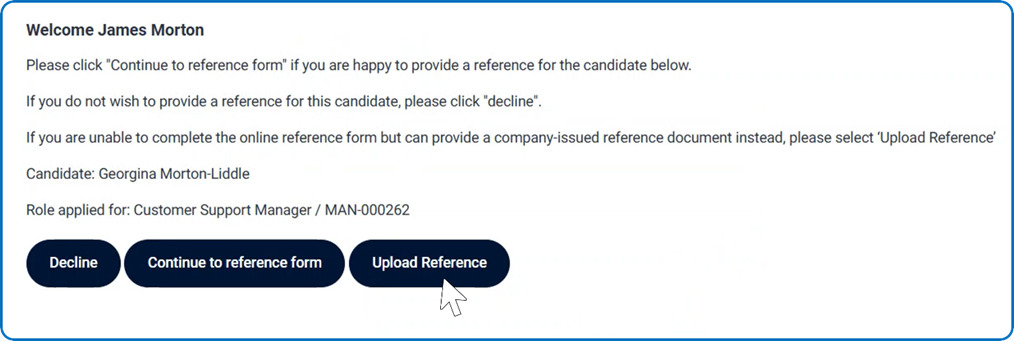
This new feature allows referees to upload reference documents directly via the Referee Portal.
Referee Document Upload (feature-based)
- Upload option available alongside Complete Form and Decline
- Supports standard reference document workflows
- Clear visibility of how references are submitted (online form, uploaded, or manual)
This provides more flexibility in how references are completed and submitted.
For full details on this update, click here for more information.
This feature will be enabled on a site-by-site basis upon request via the Jobtrain Support Team.
Choose different reference forms per referee
Availability: requires Online Referencing
Select a different reference form and email template for each referee when sending references via Start Onboarding or Add New References.
This means references can be sent in one step without needing to process each referee individually if different referencing forms are required.
- Available for clients using Online Referencing only.
Selections will be recorded in Candidate and Reference History for visibility.
Available now
The following updates and features are live in your Jobtrain platform and available to use from today.
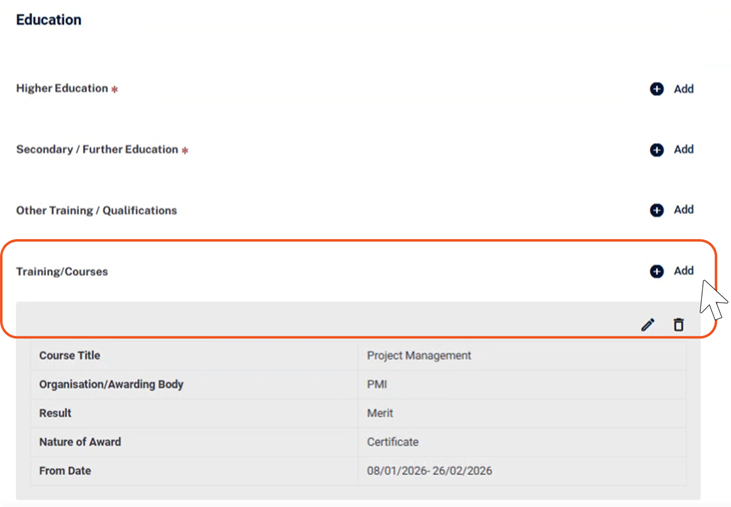
New: Structured Training/Courses section
Availability: All clients
A new structured and repeatable Training/Courses section is now available within the Education section in the application form builder. It:
- Supports structured data capture (e.g. course title, dates, awarding body)
- Allows multiple entries per candidate
- Improves consistency for reporting and candidate data
Data entered is available across candidate workflows, including reporting and exports. For full details on this update, click here for more information.
New: Easier Job Template creation
Availability: All clients
Improvements have been made to simplify job template creation:
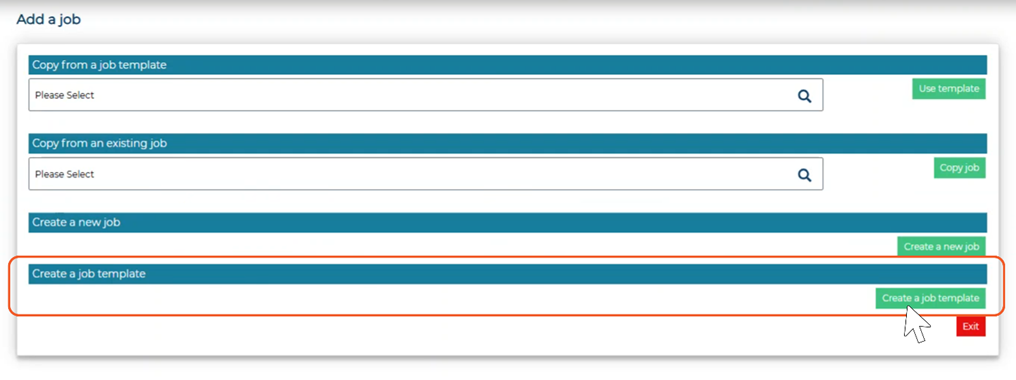
- New Create a Job Template option available in the Add a Job process
- Templates automatically saved with Template status
- Reduces required fields during creation
- Posting steps hidden until needed
Access to this feature is controlled via a new permission within Security Roles, so only authorised users will see the option.
This new feature helps makes it faster to create reusable templates while reducing the risk of unintended postings.
For full details on this update, click here for more information.
New: Reference section enhancements for candidate applications
Availability: Requires Online Referencing
This feature allows candidates to copy reference details from their employment history when completing the References section of an application. New optional date fields have also been added to support improved reporting.
Copy from Employment (feature-based)
- Allows reference details to be copied from employment history
- Available to candidates and internal users
- Enabled on a site-by-site basis
New date fields (standard)
- Date From and Date To fields are now available in the References section
- Optional and configurable in the Application Form Builder
This speeds up how reference details are completed and improves consistency across candidate data. For full details on this update, click here for more information.
If you would like to enable this feature, please contact the Jobtrain Support Team.
New: Onboarding: Start date display now configurable
Availability: Requires Enhanced Onboarding | Activation required
Define and display candidate start dates within the Onboarding Hub and New Starters page.
A Start Date can be configured using a date field from a Starter or Checklist form. Once set, this field is used to display a Start Date column across onboarding views.
Once configured, the selected Start Date field cannot be changed. This supports better visibility of upcoming starters and helps prioritise onboarding activity.
If you would like to enable this feature, please contact the Jobtrain Support Team.
New: Merge fields for screening/shortlisting scores
Availability: All clients
Insert the total or average shortlisting and interview scores directly into candidate emails using new merge fields - the total or average shortlisting and interview score.
- Available across Screening, Initial Sift, Panel Shortlisting and Interview
- Returns either total or average scores depending on form configuration
- All fields return numeric values only
Additional merge fields are available for Multi-Panel Shortlisting, including individual panel scores and combined totals.
This helps ensure consistent, data-driven communication without manual score entry.
For more details on using merge fields in email communications when shortlisting, visit our guide here.
Additional enhancements
- Onboarding: Candidate progress calculation updated (requires Enhanced Onboarding)
Progress calculation on the candidate site onboarding actions page has been updated to more accurately reflect candidate activity. The percentage now reflects candidate-assigned tasks only, while system-user actions no longer impacts the overall percentage and instead displays completion via green ticks. Where no candidate tasks are assigned, progress displays as 100%.
- Job Type (Full Time / Part Time) display on candidate site (All clients | Activation required)
The Full Time / Part Time field (Job Type) can now be displayed on the candidate site, including within job cards, vacancy listings, filters and job details. If you would like to enable this feature, please contact the Jobtrain Support Team.
- Indeed Feed: Address Field Control (All clients | Activation required)
You can now control whether Address Line 1 and Address Line 2 from the job location are included in the Indeed feed. This can be useful where full job location details should not be publicly shared (for example, roles based in private homes or community-based services). If you would like to change this behaviour, please contact the Jobtrain Support Team.
- Interview decline reason now required (All clients)
Candidates are now required to provide a reason when declining a manually scheduled interview. The decline reason is displayed when hovering over the red calendar icon, removing the need to check candidate history where access may be limited.
Was this article helpful?
That’s Great!
Thank you for your feedback
Sorry! We couldn't be helpful
Thank you for your feedback
Feedback sent
We appreciate your effort and will try to fix the article